
USB Data Storage – Is it Reliable?
Saving data to USB Flash drives (pen drives, thumb drives, USB sticks has long been a favourite way to move data from one computer to another or to back up data. Over the years, the transfer speeds have increased, as well as the capacities, meaning large chunks of data can be moved and stored with ease.
However, whilst these tiny little storage units are very handy and can be just popped into a handbag or top pocket, we could argue that storing data on USB flash drives long term may not be your best option.
As a data recovery specialist, we regularly see inaccessible USB sticks sent in to us for data recovery purposes. They have not been recoverable at the client’s local IT repair centre, as software solutions have not been effective, which normally means the device has a more severe issue. The top reasons for USB recovery at specialist level with ourselves would be either physically snapped/broken at the contacts, or the data is simply corrupt and/or inaccessible.
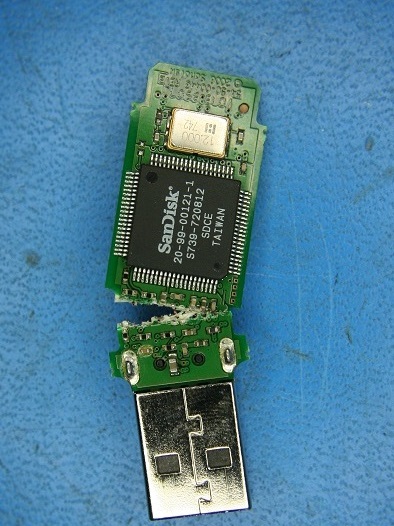
Physical damage often occurs when USB sticks are left inside laptops, and the laptop is dropped. The USB can sheer off completely leaving the silver connector inside the machine or bent to the extent that connectivity is lost. This type of repair would typically involve micro-soldering works to re-establish the joints and sometimes even use components from compatible donor boards to get the electronics on the device working again.
Data corruption, on the other hand, is often caused by abruptly removing the USB while it has not completed reading or writing (safe eject, anyone?) Bad sectors can also occur due to the degradation of the memory cells, or the USB has simply exhausted its lifespan of read/write cycles (and yes, they ALL have a limit). The sort of symptoms you would find here would be unreadable files or not being able to successfully re format the drive.
But say you are doing all these things correctly, looking after your USB Flash Drive as you should, safe ejecting, not leaving it sticking out of a machine etc. You’ve saved data to it that you don’t need to access very often, so you tuck it away in a drawer and pretty much forget about it, and only years later to unearth it for a trip down memory lane or to retrieve something important and the drive is now inaccessible – why is this?
Rather than a physical problem you can see, the issue could actually be something called “bit-rot” (otherwise known as data decay or data degradation). This is where the electrical charges in the storage cells themselves fail by losing their charge over time. This happens for several reasons but generally it is because the USB flash drive has not been powered on or accessed frequently, allowing the cells to refresh their charge. This is a silent but deadly process and will happen without any warning, often resulting in unusable files and distress. So, your USB Flash Drives are therefore at risk from overuse AND lack of use, in that respect.
When the USB Flash Drives are not used for a long period
of time, the insulating layer holding the electrons in the cells gradually
breaks down, changing the voltage state of the NAND cell. Being kept in a warm
or hot environment can also impact the health of the electrons and increase the
speed in which they can leak, leading to data loss.
To avoid digital degradation happening to your own device, the best thing to do firstly is NOT to rely on a single USB flash drive to archive important data. Unfortunately, memory sticks are not really designed for permanent or long-term storage of data, although because of their handy size and increasing capacity these days, they are being used this way as an alternative method of storage to mechanical hard disks, which have moving parts and are of course subject to different types of failure.
In our line of business of recovering data for clients, we generally recommend saving at least two hard copies of your data and one in the cloud. If you already have data on a USB flash drive, then plug it in and access the data once or twice a year to check you can still read and write to it and save a couple of new files to the USB. <o:p></o:p>
<o:p> </o:p>
Please also bear in mind that solid state drives can suffer the same fate if they are left for too long without being powered on.
EADR are always happy to inspect and verify USB flash drives and other media to determine the viability of data recovery, whether it is a data degradation issue or something more physical. Typical costs to retrieve data from memory sticks that have gone beyond a software-based recovery at your local PC shop would start from around £80 + VAT.